Setting up a Direct Debit is the easiest way to ensure your energy bills are paid automatically, securely, and on time. You can set this up quickly through the Valda Energy Customer Portal.
Step 1: Go to the Direct Debit page
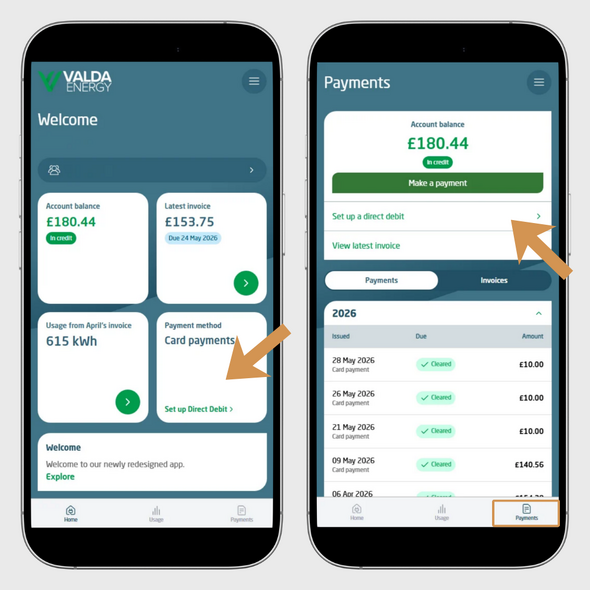
Once logged in, you can access the Direct Debit setup in two ways:
Then choose ‘Set up a Direct Debit’.
Step 2: Confirm eligibility
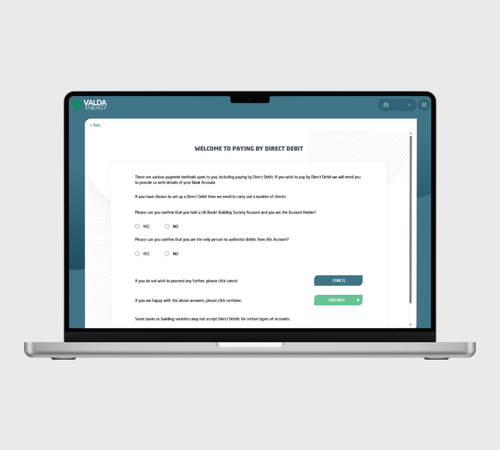
You will be asked to confirm:
Once confirmed, select ‘Continue’.
If you select ‘No’ to either question, you will need to complete a paper Direct Debit instruction and send it to the email address provided on screen.
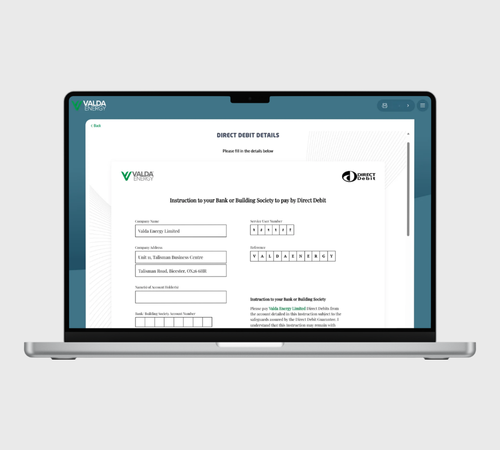
Step 3: Complete the Direct Debit mandate
You will then be asked to fill in your bank details. Please have the following information ready:
Once submitted, we will take care of the rest.
will need to complete a paper Direct Debit instruction and send it to the email address provided on screen.

Call us on:
0330 390 4510

LiveChat now